

Continuous profiling is the practice of recording where your code spends CPU time and memory, all the time, in production, with low enough overhead to leave it running. Instead of attaching a profiler after an incident starts, you keep a running record of every service and look back at the exact functions and lines of code behind a slowdown.
In March 2026, the OpenTelemetry project announced that its Profiles signal had entered public alpha. That puts profiling on a path to sit alongside metrics, logs, and traces in the same open standard. This guide explains what continuous profiling is, how it works, what the OpenTelemetry Profiles alpha changes, and how to run profiling in production today.
What is continuous profiling?
A profiler samples the call stacks of a running program and counts how often each function appears. Traditional profiling is done on demand: a developer runs a profiler on a laptop or attaches one to a server for a few minutes. Continuous profiling does the same thing across your whole fleet, all the time, and stores the results so you can query any service for any time window.
The other signals tell you that something is slow and where in the request it happened. Profiles tell you why at the code level:
| Signal | Question it answers |
|---|---|
| Metrics | Is latency or CPU usage going up? |
| Logs | What did the application say happened? |
| Traces | Which service and which call in the request took the time? |
| Profiles | Which function, and which line of code, used the CPU or memory? |
A trace can tell you a database call took 800 ms. A profile can tell you the 800 ms was spent serializing a response in one function you did not expect to be expensive.
How continuous profiling works
Most continuous profilers follow the same four steps:
- Sample. The profiler captures stack traces at a fixed rate, often around 100 samples per second for CPU profiles. Sampling, rather than instrumenting every function call, is what keeps overhead low.
- Aggregate. Identical stacks are merged and counted, so a minute of samples compresses into a compact profile.
- Upload. An agent sends profiles at a regular interval, usually every few seconds to a minute, tagged with service, host, version, and environment.
- Analyze. The backend stores profiles over time and renders them as flame graphs you can filter, compare, and link to other signals.
There are two common ways to collect profiles:
- Language profilers run inside the application runtime, for example async-profiler for Java, py-spy for Python, and pprof for Go. They understand the runtime well and can capture memory allocations, locks, and other runtime-specific data.
- eBPF-based profilers run in the Linux kernel and profile every process on a host without code changes. They are a fast way to get broad coverage, especially for compiled languages.
Common profile types
Different profile types answer different questions. Start with CPU and add others as needed.
| Profile type | What it measures | When to use it |
|---|---|---|
| CPU | Time functions spend running on the CPU | High CPU usage, slow compute paths |
| Wall time or off-CPU | Time spent waiting on I/O, locks, or the network | Requests that are slow while CPU stays low |
| Heap or allocation | Memory allocated and retained by each function | Memory leaks, frequent garbage collection |
| Lock or mutex | Time threads spend waiting for locks | Contention under load |
| I/O | Time spent on disk and network reads and writes | Slow storage or downstream calls |
How to read a flame graph
A flame graph is the standard way to view a profile.
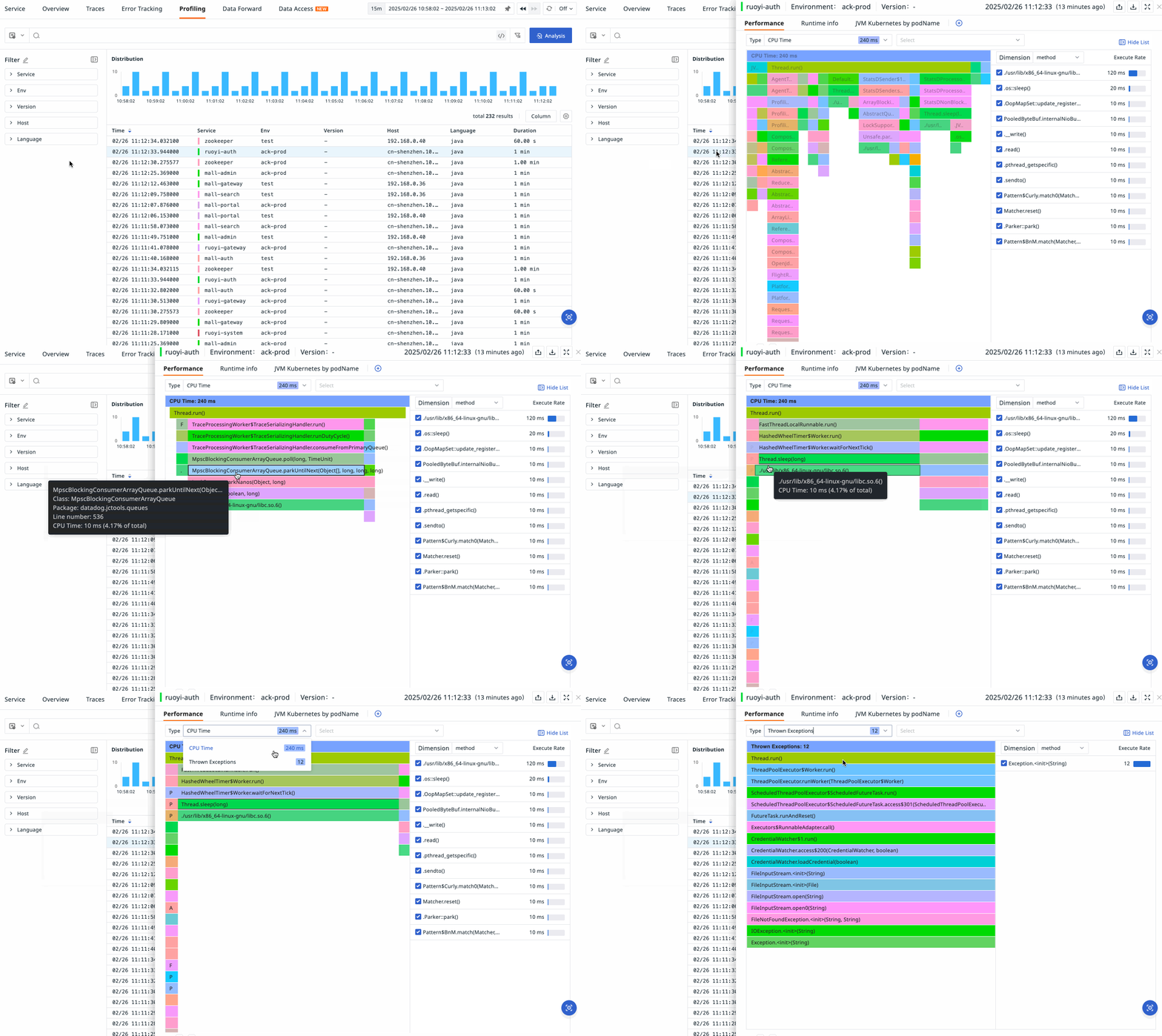
- Each box is a function. The box below it is the function that called it.
- Width is cost. The wider a box, the more samples (CPU time, memory, or wait time) it accounts for. The x-axis is not time order.
- Look for wide plateaus. A wide box near the top of a stack is a function doing a lot of work itself. That is usually where to start optimizing.
- Compare profiles. Comparing the same service before and after a deployment, or during an incident and a normal period, shows which functions changed.
What the OpenTelemetry Profiles alpha brings
On 26 March 2026, the OpenTelemetry project announced that Profiles had entered public alpha. According to the announcement, the alpha includes:
- A standard profiling format in OTLP. It deduplicates stacks to stay compact, and pprof data can be converted to and from OTLP Profiles with no loss of information.
- An eBPF-based profiler that now runs as an OpenTelemetry Collector receiver, so it can profile a whole Linux host with no code changes.
- Links to traces. Profile samples can carry
trace_idandspan_id, so a slow span can lead straight to the code that made it slow. - Collector support. A pprof receiver, Kubernetes metadata through the k8sattributesprocessor, and OTTL support for filtering and transforming profiles.
- Semantic conventions and conformance tooling for the most common profiling attributes, plus a checker that validates exported profiles against the specification.
The project is also clear about the limits. Because the signal is in alpha, it "should not be used for critical production workloads" yet, and production-ready backends for OTLP Profiles are still emerging. Beta and general availability are the next milestones.
Why OpenTelemetry Profiles matters for observability teams
Until now, profiling has usually lived in its own agent, its own format, and its own UI. OpenTelemetry Profiles changes three things over time:
- One pipeline. Profiles can travel through the same OpenTelemetry Collector you already use for metrics, logs, and traces.
- Shared context. The same resource attributes (service, version, Kubernetes pod) apply across all four signals, which makes correlation reliable.
- Less lock-in. A vendor-neutral format means you can change backends without changing how you collect profiles.
How to use continuous profiling in production today
You do not have to wait for the OpenTelemetry signal to stabilize:
- Use a mature profiler for production now. Language profilers such as async-profiler (Java) and py-spy (Python), and pprof-based tools for Go, are widely used in production.
- Experiment with the OpenTelemetry eBPF profiler in staging, so you are ready when the signal reaches beta.
- Start with CPU profiles on the services behind your most important user journeys. Add memory profiles when you chase leaks or high garbage collection time.
- Tag every profile with service, version, and environment so you can compare deployments.
- Link profiles to traces. The value grows when you can jump from a slow span to its flame graph without searching.
- Measure the overhead on your own services before rolling out widely, and set sampling rates accordingly.
Continuous profiling use cases
- Latency regressions after a release. Compare flame graphs from the old and new versions to find the function that changed.
- Cloud cost reduction. CPU profiles show which code paths consume the most compute, so you can optimize the code that drives your bill.
- Memory leaks. Heap profiles over time show which allocations keep growing.
- Incident root cause. Because profiles are always on, the data from the incident window is already there when you start investigating.
What to look for in a continuous profiling tool
- Low overhead, so it can stay on all the time
- Support for the runtimes you actually run
- Flame graphs you can compare over time and between versions
- A direct link from traces to profiles
- pprof compatibility today, and a path to OpenTelemetry Profiles
How TrueWatch handles continuous profiling
Continuous profiling is part of TrueWatch APM. Profiles are collected through DataKit, the TrueWatch collection agent, for languages including Python, Java, Go, and C/C++. TrueWatch measures the execution time, call relationships, and memory usage of functions and methods, and presents the results as flame graphs so you can find the functions and lines of code behind a bottleneck.
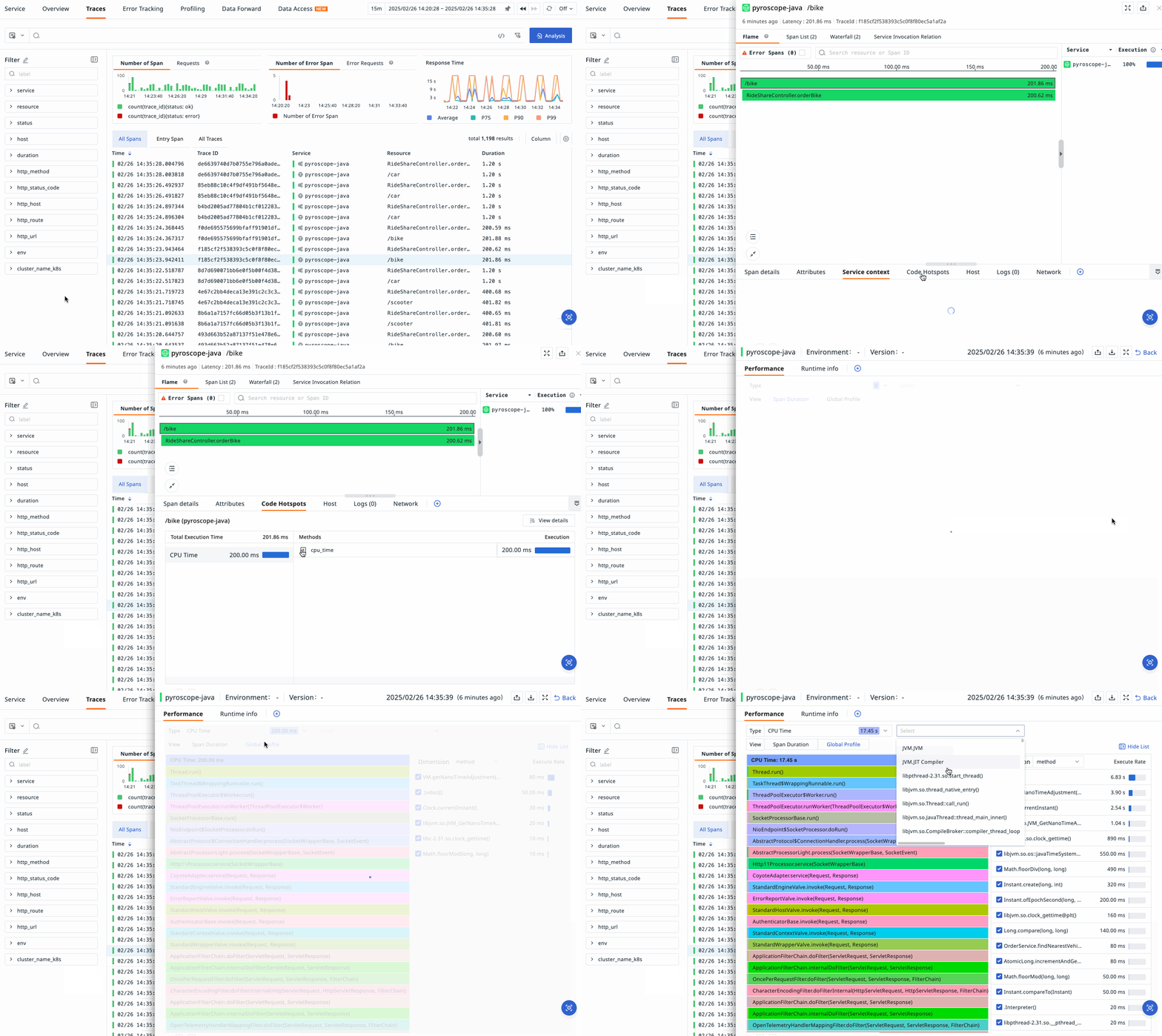
With Link Profile, TrueWatch correlates profiles with traces at the span level. From a slow request, you can open the code hotspots for that span in the same time period and see which method calls took the largest share of execution time.
Profiles are priced at $0.09 per 10,000 profiles per day, based on the volume collected by DataKit. See APM and Profiling pricing and the profiling documentation for setup details.
FAQ
What is continuous profiling?
Continuous profiling is the practice of recording CPU and memory usage at the function level in production, all the time, so you can find the exact code behind a performance problem after it happens.
What is the difference between profiling and tracing?
Tracing shows which service and which call in a request took time. Profiling shows which function and which line of code used the CPU or memory. Linking the two lets you move from a slow span to the code that caused it.
Is OpenTelemetry Profiles ready for production?
Not yet. It entered public alpha in March 2026, and the OpenTelemetry project advises against using it for critical production workloads until it reaches a more stable release.
Does continuous profiling slow down my application?
Continuous profilers, including eBPF-based ones, use sampling to keep overhead low so they can run in production. Measure the overhead on your own services before rolling out widely.
What is eBPF profiling?
eBPF profiling uses the Linux kernel's eBPF technology to sample stacks for every process on a host, with no code changes. OpenTelemetry now includes an eBPF profiler that runs as a Collector receiver.
How do you read a flame graph?
Each box is a function, and the box below it is its caller. Width shows how much CPU time or memory a function accounts for. Start with the widest boxes near the top of the stack.
Sources
- OpenTelemetry Profiles Enters Public Alpha, OpenTelemetry blog, 26 March 2026
- TrueWatch Continuous Profiling
- TrueWatch APM and Profiling pricing
- TrueWatch profiling documentation
